

Instead of manually forwarding every corporate event calendar change to a private chef, create a shared event brief, assign one coordinator, and require written acknowledgment of changes. This guide shows Dallas and Fort Worth hosts how to connect scheduling, personalized menus, and service planning without treating a calendar invitation as a confirmed booking.
- Corporate event calendar private chef planning needs a shared brief, a named coordinator, and written confirmation.
- Gabbeys suits corporate hosts seeking personalized menus and attentive private chef service.
- Keep dietary details separate from broadly shared invitations; share only necessary information with the chef.
- Calendar reminders prompt a review; they do not confirm a booking or approve a menu change.
Why this matters
A meeting invitation answers when people should arrive. A chef also needs to know when the kitchen becomes accessible, when food should reach guests, and who can approve a change. Without that distinction, a revised meeting time leaves the dining plan behind.
Gabbeys private chef service is best for corporate hosts who prioritize personalized menus and attentive service. Start your inquiry with Gabbeys using a clear event brief rather than an invitation alone.
For your 2026 corporate calendar, separate the guest schedule from the service schedule. A client dinner at a Dallas home, a Fort Worth team gathering, and a conference meal each need their own instructions, even when the same person organizes them.
Before you start
- Calendar access and an owner: Choose someone who can edit the event, receive the chef's replies, and approve changes. Have the venue contact and internal decision-maker identified before sending an inquiry.
- A working event brief: Gather the date, city, venue address, estimated attendance, meal purpose, dietary requirements, kitchen information, and spending parameters. Mark unresolved items as pending rather than presenting assumptions as decisions.
- The non-obvious gotcha: A recurring invitation or accepted calendar request does not establish a service agreement. Ask how the chef wants to receive changes, and keep sensitive dietary information out of invitations shared with the whole company.
You do not need a software integration to follow this workflow. You need a dependable handoff between your calendar and the person responsible for the food and service.
Choose your calendar handoff
Two practical approaches connect corporate scheduling with chef coordination. Choose according to how often events repeat and how much information changes between them.
| Workflow | Best for | Advantage | Limitation |
|---|---|---|---|
| Event-by-event brief | Individual client dinners, private parties, or changing venues | Keeps each menu and service plan tied to a specific occasion | Requires a fresh review for every event |
| Recurring calendar with individual briefs | Repeated team meals or regular hosted dinners | Creates a repeatable planning rhythm | Repeated dates still need separate confirmation and exception handling |
Use an event-by-event brief when the venue, guests, or purpose changes. Use a recurring calendar when the pattern repeats, but confirm the service arrangements separately. Neither method replaces a written agreement.
For Gabbeys corporate event planning, use personalization and attentive service as your selection criteria. Ask how the proposed menu and service approach fit the occasion; do not assume calendar access includes scheduling automation or administrative support.
Event record and planning brief
Establish the event details
- Create a dedicated calendar entry for the corporate meal. Use a recognizable title that includes the event purpose and city, rather than a vague label such as company event.
- Enter the guest-facing start and end times. Specify the venue's local time zone, especially when executives or assistants work outside Texas.
- Record the full venue address and access instructions in the event brief. Distinguish a private residence from an office or rented venue.
- Add the intended meal moment: arrival refreshments, a seated dinner, or a meal between meeting sessions. Keep this separate from the overall meeting duration.
- Assign a named coordinator and backup contact. State who can authorize menu, attendance, or schedule changes.
Expected result: A reader can identify where the meal happens, when guests eat, and who makes decisions without searching through email threads.
Separate confirmed details from open questions
Create clear sections in the brief: Event details, Menu needs, Venue access, and Approvals. These are suggested document headings, not software settings.
Under menu needs, describe the experience you want and the dietary requirements that need discussion. Do not promise a specific dish to guests before the chef agrees to prepare it. For a more focused conversation, use this guide to planning a menu with a private chef.
For a 2026 event, use a complete date rather than a month and day alone. Keep one current brief and date each revision so an older attachment cannot quietly become the working plan.
Chef handoff and written agreement
Send a decision-ready inquiry
- Send the event brief through the chef's agreed communication channel. Ask which details are needed to assess the request and prepare a personalized quote.
- Explain the event's purpose. A relationship-building client dinner needs a different discussion from a meal served during a working session.
- Describe the kitchen and venue access accurately. Ask what equipment, preparation space, staffing, and service arrangements the proposed plan requires.
- Request a written outline of scope, responsibilities, and terms. Clarify who handles any agreed tableware, rentals, serving duties, and cleanup rather than assuming inclusion.
- Record the response in the brief. Keep a requested date distinct from an agreed service date.
Expected result: Your coordinator knows what has been proposed, what has been agreed, and what still requires a decision.
Align the calendar with the agreed scope
Once arrangements are agreed, reflect the relevant milestones in your calendar. Include the agreed access time, guest arrival, intended meal service, and venue handback where applicable.
A calendar entry should summarize the agreement, not rewrite it. If the agreement and invitation differ, resolve the discrepancy directly and update the record only after both sides acknowledge the correction.
Ask for a personalized quote based on the actual brief. Guest count, menu complexity, service format, staffing, venue conditions, and event duration belong in that discussion. A calendar slot alone does not define the work.
Plan your corporate dining inquiry
Share your Dallas or Fort Worth event details, menu preferences, and service needs.
Review reminders and change control
Create checkpoints that prompt decisions
- Add an internal planning reminder before your agreed deadline for menu or attendance decisions. Use the deadline in the service agreement, not a generic rule from another event.
- Schedule a review of guest count, dietary requirements, venue access, and the meeting agenda. Keep the review assigned to the coordinator.
- Put a final operational check on the calendar. Verify the current brief against the agreed service plan and send unresolved questions directly.
- Ask for acknowledgment when a change affects the chef's work. Do not rely on an updated invitation being noticed.
Expected result: Every reminder leads to a specific review or approval rather than another notification without an owner.
For example, reserve 15 minutes for an internal brief review and 10 minutes for a venue-access check. These are suggested planning blocks, not Gabbeys service requirements. If your team reviews 1 event per week, give that review a named owner rather than distributing responsibility across the guest list.
Use a simple change sequence
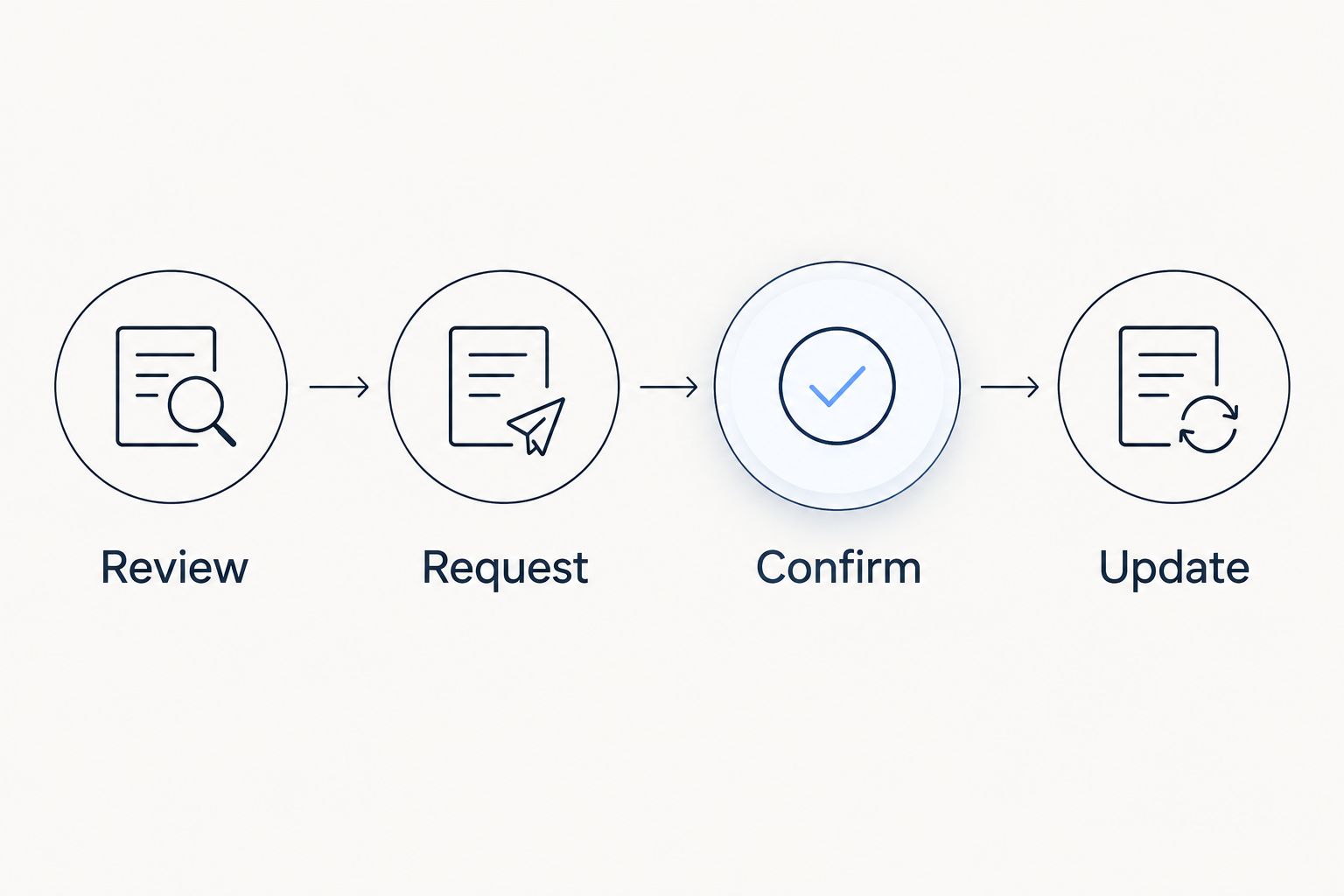
For your 2026 planning process, follow the same sequence whenever the event changes:
- Review: Identify exactly what changed and which service details it affects.
- Request: Send the proposed change through the agreed channel.
- Confirm: Obtain written acknowledgment of the revised arrangements.
- Update: Revise the calendar and current brief to match the agreement.
If a dinner shifts later, explain whether guest arrival, kitchen access, and meal service all move together. A single changed start time does not communicate those distinctions.
Updated events and recurring meals
Repeat the process without copying assumptions
A recurring calendar works for repeated team meals, but the event brief still needs an individual review. Copy the structure, not the previous event's approvals.
- Create the recurring planning entry for your internal team. Keep the recurrence separate from any claim that future chef services are agreed.
- Prepare an individual brief for each meal date. Refresh attendance, dietary needs, location, and the desired experience.
- Review exceptions before sending the request. A leadership offsite, holiday gathering, or different venue needs its own service discussion.
- Confirm each date or the recurring arrangement in writing, according to the agreement. Record changes to individual dates clearly.
Expected result: Repetition reduces administrative rework without allowing an old guest count or menu decision to control a new occasion.
In 2026, keep recurring in-home meal prep separate from corporate entertaining. Gabbeys offers meal prep, private dinners, parties, and wedding services, but those requests serve different purposes. An executive's household meal preferences should not become a company dinner brief by default.
If an updated invitation triggers an internal task, make that task a review request. Do not configure it to represent chef acceptance, menu approval, or a revised service agreement.
Troubleshooting
The invitation changed, but the chef's plan did not
Send the exact change directly through the agreed communication channel. State whether it affects venue access, guest arrival, meal timing, or all of them, and request acknowledgment before treating it as settled.
A recurring entry carries outdated attendance
Correct the individual event brief and identify the affected date. Review future entries separately; changing the whole series can overwrite details that remain correct for other occasions.
Guests can see private dietary information
Remove personal health details from the broadly shared invitation. Keep necessary dietary instructions in a restricted brief and share them only with the people responsible for planning and preparing the meal.
The venue cannot support the proposed service
Discuss the kitchen, equipment, access, and preparation constraints before finalizing the plan. Ask the chef what changes are needed; do not assume an office kitchenette supports the same service as a residential kitchen.
Nobody knows which version is approved
Designate one current brief and identify its revision date. Have the coordinator reconcile conflicting instructions with the chef, then replace outdated internal references rather than sending another competing attachment.
Customize your workflow
Keep a reusable inquiry template for Dallas and Fort Worth events, with separate prompts for private dinners, corporate gatherings, and weddings. The structure stays familiar while the guest experience remains personal.
For Gabbeys private chef inquiries, describe what attentive service means for your occasion: uninterrupted conversation, a meal coordinated around presentations, or a relaxed celebration at home. Ask which arrangements support that goal rather than assuming a particular staffing model.
For your remaining 2026 calendar, review events by purpose before requesting menus. Separate recurring household meal prep from client entertaining, and separate wedding planning from office hospitality. That distinction produces a clearer inquiry and a more useful service discussion.
FAQ
How do I connect my corporate event calendar to a private chef?
Connect the calendar to a shared event brief and a named coordinator. Send the brief through the chef's agreed communication channel, confirm service arrangements in writing, and update the calendar to match.
Does accepting a calendar invitation confirm my private chef booking?
Do not treat calendar acceptance as booking confirmation. Follow the chef's booking process and written agreement, and distinguish requested dates from agreed service dates.
Can I automatically send every calendar change to my chef?
Use automatic notifications only as prompts for review unless a different process is explicitly agreed. Changes to timing, attendance, venue, or menus need clear communication and acknowledgment.
What should I include in a Dallas or Fort Worth corporate chef inquiry?
Include the event date, city, venue, estimated guest count, meal purpose, dietary requirements, kitchen information, and desired service approach. Identify the coordinator and any details that remain undecided.
How do I coordinate a private chef for recurring corporate meals?
Use a recurring planning calendar with an individual brief for each meal. Confirm the recurring arrangement or individual dates in writing, and review exceptions instead of assuming every event is identical.
How should I share food allergies with a private chef?
Share necessary allergy information directly through an agreed, appropriately restricted channel. Keep personal health details out of broadly distributed calendar invitations and discuss preparation requirements with the chef.
What affects the quote for a corporate private chef event?
The quote depends on the agreed menu, guest count, service format, staffing, venue conditions, and event duration. Request a personalized quote based on the complete event brief rather than using the calendar duration alone.
One last thing
The most useful calendar entry is the one that distinguishes a request from an agreement. Label unresolved items clearly and keep the approval trail beside the current brief. A polished evening starts with a plan that your coordinator and chef understand the same way.